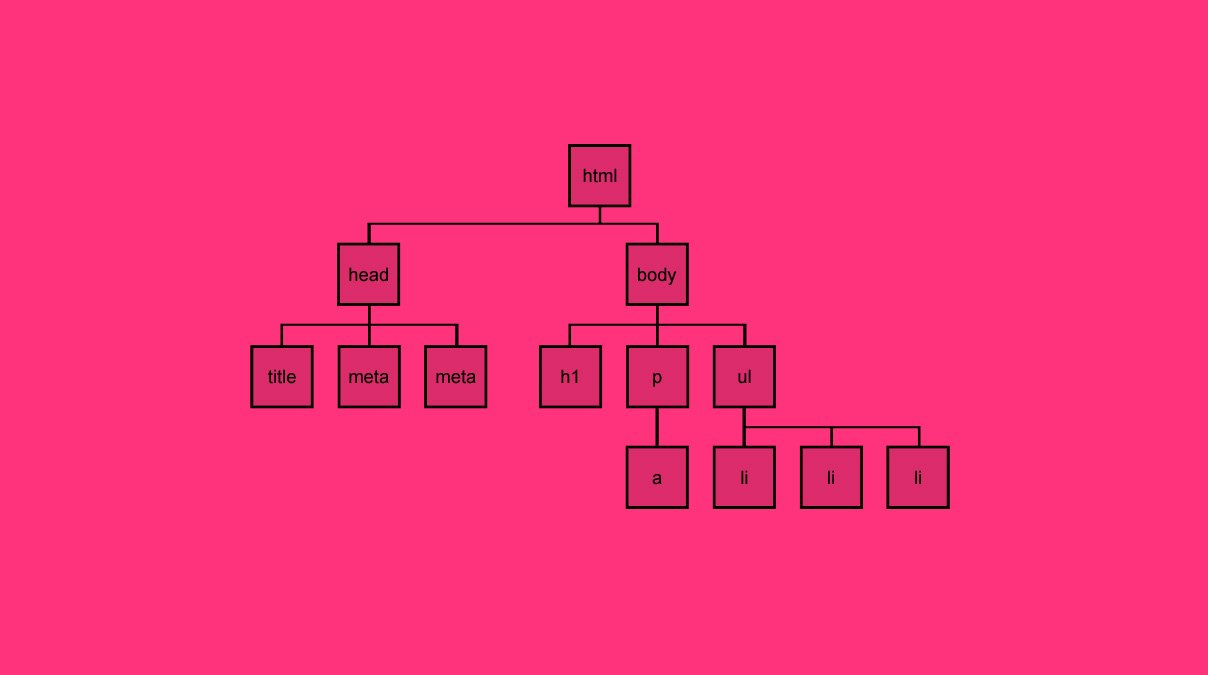
HTML 태그는 HTML 요소의 시작과 끝을 표시하며 속성을 포함 할 수 있습니다. 다음과 같이 사용됩니다.
<tagname>Element content</tagname><tagnameattributename="attributevalue">Element content</tagname><!-- or, for the few attributes without values, simply: --><tagnameattributename>Element content</tagname><!-- or, for the few elements without content, simply: --><tagname><tagnameattributename="attributevalue"><tagname>Element content</tagname><tagnameattributename="attributevalue">Element content</tagname><!-- or, for the few attributes without values, simply: --><tagnameattributename>Element content</tagname><!-- or, for the few elements without content, simply: --><tagname><tagnameattributename="attributevalue">
전역 속성(global attributes)은 각 페이지에 나열된 특정 속성과 함께 모든 태그와 함께 사용할 수 있습니다.
Heading은 문서에서 새로운 섹션(new section)이나 하위 섹션(sub-section)의 시작을 정의 할 때 완벽하게 효율적인 접근이지만, 더 명확하고 정확한 의미 구조(semantic structure)를 확립하기 위해 잘못 사용될 수 있는 여지가 있습니다.
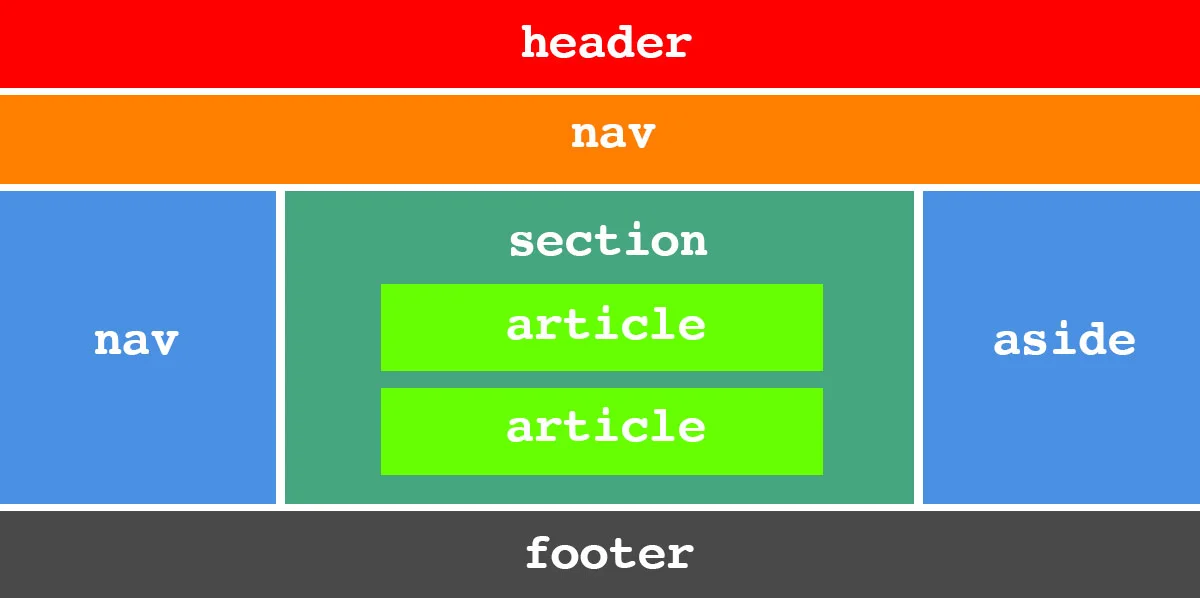
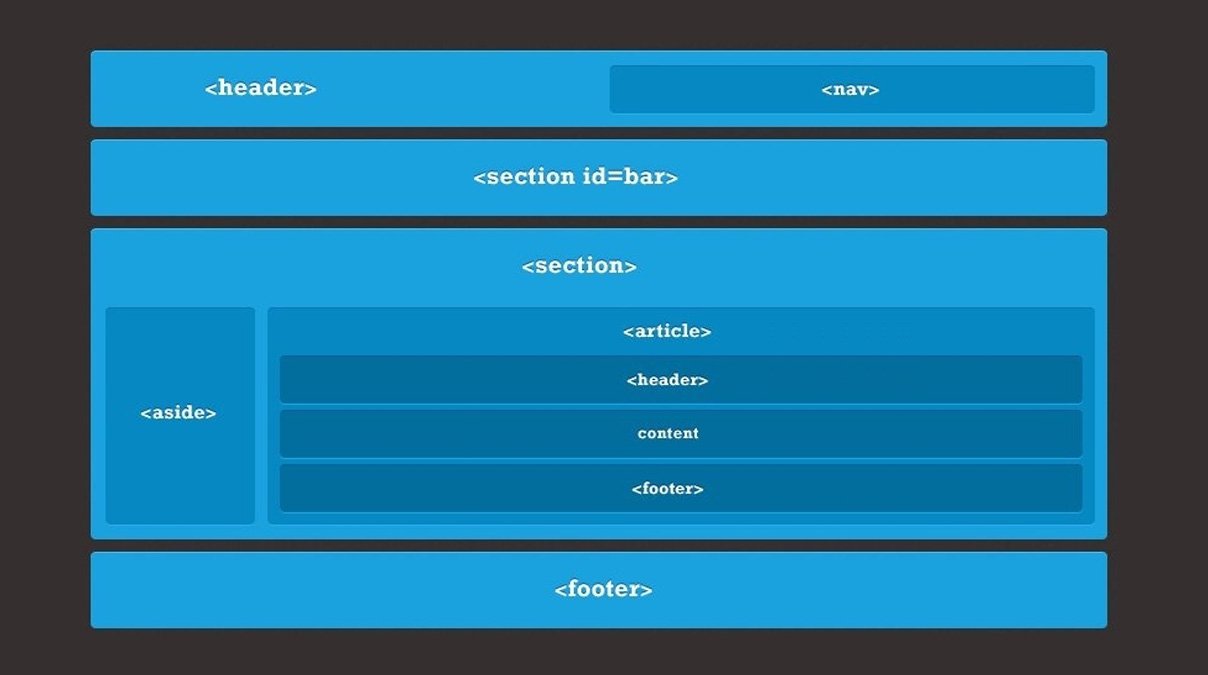
div 엘리먼트는 주로 CSS를 걸 수 있는 스캐폴딩(scaffolding)으로 사용되는 섹션을 포함하는 데 사용할 수 있지만 큰 의미는 없습니다. 단면 처리(sectioning)에는 기사(articles), 머리글(headers), 바닥 글(footers) 및 내비게이션(navigation)과 같이 페이지의 특정 부분을 정의하는 데 사용할 수 있는 몇 개의 태그가 포함됩니다.
Articles과 Sections
article 요소는 독립형 콘텐츠 섹션을 마크업하는 데 사용할 수 있습니다. 예를 들어 블로그 게시물을 기사로 생각하거나 많은 기사가 담긴 전통적인 신문 페이지를 복제하는 경우 여러 번 생각하면 이 작업은 한 번만 사용할 수 있습니다.
섹션 요소는 보다 일반적인 섹션을 나타내며 예를 들어 기사를 분할하거나 챕터(chapters)를 나타내는 데 사용할 수 있습니다.
<article><sectionid="intro"><p>[An introduction]</p></section><sectionid="main_content"><p>[Content]</p></section><sectionid="related"><ul><li><ahref="that.html">That related article</a></li><li><ahref="this.html">This related article</a></li></ul></section></article>
div가 이러한 분리를 만드는 데 사용될 수 있지만 ( 또는 스타일링을 위해 이러한 구분이 필요하지 않은 경우에도 ) 훨씬 풍부하고 의미 있는 문서를 제공합니다.
Caution:HTML5 사양은 각 섹션의 시작 부분에 h1 요소를 사용할 수 있음을 제안합니다. 이 요소는 해당 섹션 앞의 모든 항목의 하위 제목이 됩니다. ( 위의 예에서 h1이 오프닝 article 태그 바로 다음에 오는 경우 html은 오프닝 섹션 태그 바로 다음에 해당 초기 h1의 하위 제목이됩니다.) 그러나 이 나사는 이전 버전과의 호환성을 보장하지 않으며 이를 이해하지 못하는 사용자 에이전트 (스크린 리더 포함)는 제대로 구조화된 제목 수준을 적용하지 않습니다. 섹션을 사용하지 않았다면 사용할 표제 수준을 고수하는 것이 좋습니다. (예 : 섹션 1과 관계없이 h2 등). 이것은 무엇인가를 망가뜨리거나 의미 나 의미를 손상시키지 않습니다.
Headers와 Footers
머리글(Headers)과 바닥 글(Footers)은 보다 전문화되고 자체 설명이 가능한 섹션을 제공합니다.
바닥 글(Footers)은 포함되어있는 섹션의 꼬리말입니다. 위의 예에서 첫 번째 바닥 글은 집필의 바닥 글이고 두 번째 바닥 글은 페이지의 바닥 글입니다.
Asides
Aside는 콘텐츠를 둘러싼 콘텐츠와 관련된 콘텐츠를 나타내는 데 사용할 수 있습니다. Article에서 관련 정보의 인용 내용 또는 미리보기를 생각해보십시오.
<sectionid="main_content"><h1>Tixall</h1><p>[All about Tixall]</p><aside><h2>Tixall Obelisk</h2><p>[A short note about Tixall Obelisk]</p></aside><p>[Maybe a bit more about Tixall]</p></section>
Aside는 콘텐츠를 둘러싼 콘텐츠와 관련된 콘텐츠를 나타내는 데 사용할 수 있습니다. Article에서 관련 정보의 인용 내용 또는 미리보기를 생각해보십시오.
우리가 이 구조에 집중하는 동안,
figures를 포함 시키려면, 그 일을하기위한 두 개의 태그가있을 수 있습니다.
Note:이는 또한 페이지 내 내비게이션 (<a href=”#overthere”> … 등)에도 사용될 수 있지만 모든 그룹 링크에 필요하지는 않으며 주요 그룹으로 설계되었습니다. 예를 들어, 저작권(copyright), 저자(author) 및 연락처 링크(contact link)는 바닥 글 요소(footer element)에 단독으로 배치할 수 있습니다.
Caution:이러한 새로운 HTML 5 요소의 스타일을 지정하려면 (예 : <div id = “content”> … 등을 사용하는 것보다 훨씬 낫습니다) 이전 버전의 브라우저, 특히 Internet Explorer에서 문제가 발생할 것입니다 버전 8 이하는 이러한 태그를 이해하지 못합니다. 그러나 HTML5 Shiv가 문제를 해결할 수 있습니다. head 부분에 삽입 된 작은 Javascript로, 브라우저를 새로운 HTML 5 태그를 사용할 수 있도록 CSS의 다양한 속성까지 스타일을 지정할 수 있습니다.
HTML 문서의 일반적인 섹션을 예를 들어, 기사(articles)를 분할하거나 챕터(chapters)를 나타내는 데 사용할 수 있습니다.
<article><sectionid="intro"><!-- An introduction --></section><sectionid="main_content"><!-- Main content --></section><sectionid="related"><ul><li><ahref="that.html">That related article</a></li><li><ahref="this.html">This related article</a></li></ul></section></article>
Note:전역 속성(Global Attributes)
HTML Tag : header
소개 콘텐츠 또는 내비게이션 기능이 포함 된 페이지 또는 섹션의 머리글(headers)입니다.
<body><header><!-- A header for the page. --></header><section><header><!-- A header for the section. --></header></section></body>
HTML Tag : footer
페이지 또는 섹션의 바닥 글(footers). 여기에는 포스트 스크립트, 부록 또는 관련 페이지에 대한 링크와 같은 내용이 포함될 수 있습니다.
<body><section><!-- stuff --><footer><!-- A footer for the section. --></footer></section><footer><!-- A footer for the page. --></footer></body>
HTML Tag : aside
콘텐츠를 둘러싼 콘텐츠와 관련이 있지만, 콘텐츠와 별개입니다. 기사(articles)에서 관련 정보의 인용 글 또는 미리보기는 aside 태그로 마크업 할 수 있는 콘텐츠의 예입니다.
<sectionid="main_content"><h1>Tixall</h1><!-- All about Tixall --><aside><h2>Tixall Obelisk</h2><!-- A short note about Tixall Obelisk --></aside><!-- A bit more about Tixall --></section>
<!DOCTYPEhtml><html><head><metacharset="utf-8"><title>Page layout 1</title> <style>body{font:80% arial, helvetica, sans-serif;margin:0;}#navigation{position: absolute;left:0;width:15em;}#content{color:#ccc;}</style></head><body><divid="navigation"><ul><li><ahref="">Biology</a></li><li><ahref="">Evolution</a></li><li><ahref="">Natural Selection</a></li><li><ahref="">Genetics</a></li></ul><ul><li><ahref="">Erasmus Darwin</a></li><li><ahref="">Lamarck</a></li><li><ahref="">Charles Darwin</a></li><li><ahref="">Wallace</a></li><li><ahref="">Dawkins</a></li></ul></div><divid="content"><h2>On the Origin of The Origin</h2><p>Darwin's father was dead set on his son becoming a cleric but even though the young rapscallion began to study theology he found worms much more interesting.</p><p>When a lonely man with a moustache asked Darwin to ride with him on his boat named after a dog, Darwin agreed and set off around the world fiddling with wildlife.</p><p>Some say it was a load of birds from a bunch of islands hundreds of miles off the Ecuadorean coast that inspired his now widely accepted explanation of the mechanism of evolution. "Why does that bird on that island have a beak like that while that finch on that island has a beak like that? AHA! I've got it! Natural Selection!" he thought. It wasn't actually quite like that, but, y'know, it's a fine, popular romantic myth.</p><h2>The Origin</h2><p>Upon return from his jaunt, Charles chronicled his escapades (as <em>The Voyage of the Beagle</em>) and got a bit carried away with barnacles, although his theory of evolution was always ticking away in the back of his mind.</p><p>Some 20 or so year after he returned to England, a Welsh naturalist by the name of Wallace popped up with a similar idea to Darwin's grand theory. Darwin got a move on.</p><p>In 1858 a paper jointly attributed to Darwin and Wallace was presented to the Linnean Society of London that sent rumbles across the establishment and really ticked off a fair few people. The next year saw the publication of Darwin's 500-page "abstract" - <em>On The Origin of Species by Means of Natural Selection or the Preservation of Favoured Races In The Struggle For Life</em> (or <abbr>OTOOSBMONSOTPOFRITSFL</abbr> for short).</p><p>Darwin, already a prominent arc in scientific circles, was propelled into megastardom.</p><h2>After The Origin</h2><p>Chuck D revised The Origin five times, toning down each one a bit more than the one before it, partly to appease his religious wife. Who also happened to be his cousin. But some years later he'd had enough of trying to disguise the logical conclusion that humans are descended from the same common ancestor as all other animals and his third classic, <em>The Descent of Man</em>, was published and <em>really</em> pissed off the religious establishment.</p></div></body></html>
페이지 레이아웃 2 : 2 columns – 2 단계 : 여백을 사용하여 네비게이션 열 아래에서 콘텐츠를 밀어냅니다.
<!DOCTYPE html>
<html>
<head>
    <meta charset="utf-8">
    <title>Page layout 2</title>
    <style>
        body {
            font: 80% arial, helvetica, sans-serif;
            margin: 0;
        }

        #navigation {
            position: absolute;
            left: 0;
            width: 15em;
        }
        #content {
            margin-left: 15em;
        }
    </style>
</head>
<body>
    <div id="navigation">
        <ul>
            <li><a href="">Biology</a></li>
            <li><a href="">Evolution</a></li>
            <li><a href="">Natural Selection</a></li>
            <li><a href="">Genetics</a></li>
        </ul>
        <ul>
            <li><a href="">Erasmus Darwin</a></li>
            <li><a href="">Lamarck</a></li>
            <li><a href="">Charles Darwin</a></li>
            <li><a href="">Wallace</a></li>
            <li><a href="">Dawkins</a></li>
        </ul>
    </div>
    <div id="content">
        <h2>On the Origin of The Origin</h2>
        <p>Darwin's father was dead set on his son becoming a cleric but even though the young rapscallion began to study theology he found worms much more interesting.</p>
        <p>When a lonely man with a moustache asked Darwin to ride with him on his boat named after a dog, Darwin agreed and set off around the world fiddling with wildlife.</p>
        <p>Some say it was a load of birds from a bunch of islands hundreds of miles off the Ecuadorean coast that inspired his now widely accepted explanation of the mechanism of evolution. "Why does that bird on that island have a beak like that while that finch on that island has a beak like that? AHA! I've got it! Natural Selection!" he thought. It wasn't actually quite like that, but, y'know, it's a fine, popular romantic myth.</p>
        <h2>The Origin</h2>
        <p>Upon return from his jaunt, Charles chronicled his escapades (as <em>The Voyage of the Beagle</em>) and got a bit carried away with barnacles, although his theory of evolution was always ticking away in the back of his mind.</p>
        <p>Some 20 or so year after he returned to England, a Welsh naturalist by the name of Wallace popped up with a similar idea to Darwin's grand theory. Darwin got a move on.</p>
        <p>In 1858 a paper jointly attributed to Darwin and Wallace was presented to the Linnean Society of London that sent rumbles across the establishment and really ticked off a fair few people. The next year saw the publication of Darwin's 500-page "abstract" - <em>On The Origin of Species by Means of Natural Selection or the Preservation of Favoured Races In The Struggle For Life</em> (or <abbr>OTOOSBMONSOTPOFRITSFL</abbr> for short).</p>
        <p>Darwin, already a prominent arc in scientific circles, was propelled into megastardom.</p>
        <h2>After The Origin</h2>
        <p>Chuck D revised The Origin five times, toning down each one a bit more than the one before it, partly to appease his religious wife. Who also happened to be his cousin. But some years later he'd had enough of trying to disguise the logical conclusion that humans are descended from the same common ancestor as all other animals and his third classic, <em>The Descent of Man</em>, was published and <em>really</em> pissed off the religious establishment.</p>
    </div>
</body>
</html>
<!DOCTYPE html>
<html>
<head>
    <meta charset="utf-8">
    <title>Page layout 3</title>
    <style>
        body {
            font: 80% arial, helvetica, sans-serif;
            margin: 0;
        }

        h2 {
            margin-top: 0;
        }

        #navigation {
            position: absolute;
            left: 0;
            width: 15em;
        }
        #content {
            border-left: 15em solid #ccf;
        }
    </style>
</head>
<body>
    <div id="navigation">
        <ul>
            <li><a href="">Biology</a></li>
            <li><a href="">Evolution</a></li>
            <li><a href="">Natural Selection</a></li>
            <li><a href="">Genetics</a></li>
        </ul>
        <ul>
            <li><a href="">Erasmus Darwin</a></li>
            <li><a href="">Lamarck</a></li>
            <li><a href="">Charles Darwin</a></li>
            <li><a href="">Wallace</a></li>
            <li><a href="">Dawkins</a></li>
        </ul>
    </div>
    <div id="content">
        <h2>On the Origin of The Origin</h2>
        <p>Darwin's father was dead set on his son becoming a cleric but even though the young rapscallion began to study theology he found worms much more interesting.</p>
        <p>When a lonely man with a moustache asked Darwin to ride with him on his boat named after a dog, Darwin agreed and set off around the world fiddling with wildlife.</p>
        <p>Some say it was a load of birds from a bunch of islands hundreds of miles off the Ecuadorean coast that inspired his now widely accepted explanation of the mechanism of evolution. "Why does that bird on that island have a beak like that while that finch on that island has a beak like that? AHA! I've got it! Natural Selection!" he thought. It wasn't actually quite like that, but, y'know, it's a fine, popular romantic myth.</p>
        <h2>The Origin</h2>
        <p>Upon return from his jaunt, Charles chronicled his escapades (as <em>The Voyage of the Beagle</em>) and got a bit carried away with barnacles, although his theory of evolution was always ticking away in the back of his mind.</p>
        <p>Some 20 or so year after he returned to England, a Welsh naturalist by the name of Wallace popped up with a similar idea to Darwin's grand theory. Darwin got a move on.</p>
        <p>In 1858 a paper jointly attributed to Darwin and Wallace was presented to the Linnean Society of London that sent rumbles across the establishment and really ticked off a fair few people. The next year saw the publication of Darwin's 500-page "abstract" - <em>On The Origin of Species by Means of Natural Selection or the Preservation of Favoured Races In The Struggle For Life</em> (or <abbr>OTOOSBMONSOTPOFRITSFL</abbr> for short).</p>
        <p>Darwin, already a prominent arc in scientific circles, was propelled into megastardom.</p>
        <h2>After The Origin</h2>
        <p>Chuck D revised The Origin five times, toning down each one a bit more than the one before it, partly to appease his religious wife. Who also happened to be his cousin. But some years later he'd had enough of trying to disguise the logical conclusion that humans are descended from the same common ancestor as all other animals and his third classic, <em>The Descent of Man</em>, was published and <em>really</em> pissed off the religious establishment.</p>
    </div>
</body>
</html>
<!DOCTYPE html>
<html>
<head>
    <meta charset="utf-8">
    <title>Page layout 4</title>
    <style>
        body {
            font: 80% arial, helvetica, sans-serif;
            margin: 0;
        }

        h2 {
            margin-top: 0;
        }

        #navigation1 {
            position: absolute;
            left: 0;
            width: 200px;
        }
        #navigation2 {
            position: absolute;
            right: 0;
            width: 150px;
        }

        #content {
            margin: 0 150px 0 200px;
        }
    </style>
</head>
<body>
    <div id="navigation1">
        <ul>
            <li><a href="">Biology</a></li>
            <li><a href="">Evolution</a></li>
            <li><a href="">Natural Selection</a></li>
            <li><a href="">Genetics</a></li>
        </ul>
    </div>
    <div id="navigation2">
        <ul>
            <li><a href="">Erasmus Darwin</a></li>
            <li><a href="">Lamarck</a></li>
            <li><a href="">Charles Darwin</a></li>
            <li><a href="">Wallace</a></li>
            <li><a href="">Dawkins</a></li>
        </ul>
    </div>
    <div id="content">
        <h2>On the Origin of The Origin</h2>
        <p>Darwin's father was dead set on his son becoming a cleric but even though the young rapscallion began to study theology he found worms much more interesting.</p>
        <p>When a lonely man with a moustache asked Darwin to ride with him on his boat named after a dog, Darwin agreed and set off around the world fiddling with wildlife.</p>
        <p>Some say it was a load of birds from a bunch of islands hundreds of miles off the Ecuadorean coast that inspired his now widely accepted explanation of the mechanism of evolution. "Why does that bird on that island have a beak like that while that finch on that island has a beak like that? AHA! I've got it! Natural Selection!" he thought. It wasn't actually quite like that, but, y'know, it's a fine, popular romantic myth.</p>
        <h2>The Origin</h2>
        <p>Upon return from his jaunt, Charles chronicled his escapades (as <em>The Voyage of the Beagle</em>) and got a bit carried away with barnacles, although his theory of evolution was always ticking away in the back of his mind.</p>
        <p>Some 20 or so year after he returned to England, a Welsh naturalist by the name of Wallace popped up with a similar idea to Darwin's grand theory. Darwin got a move on.</p>
        <p>In 1858 a paper jointly attributed to Darwin and Wallace was presented to the Linnean Society of London that sent rumbles across the establishment and really ticked off a fair few people. The next year saw the publication of Darwin's 500-page "abstract" - <em>On The Origin of Species by Means of Natural Selection or the Preservation of Favoured Races In The Struggle For Life</em> (or <abbr>OTOOSBMONSOTPOFRITSFL</abbr> for short).</p>
        <p>Darwin, already a prominent arc in scientific circles, was propelled into megastardom.</p>
        <h2>After The Origin</h2>
        <p>Chuck D revised The Origin five times, toning down each one a bit more than the one before it, partly to appease his religious wife. Who also happened to be his cousin. But some years later he'd had enough of trying to disguise the logical conclusion that humans are descended from the same common ancestor as all other animals and his third classic, <em>The Descent of Man</em>, was published and <em>really</em> pissed off the religious establishment.</p>
    </div>
</body>
</html>
<!DOCTYPE html>
<html>
<head>
    <meta charset="utf-8">
    <title>Page layout 5</title>
    <style>
        body {
            font: 80% arial, helvetica, sans-serif;
            margin: 0;
        }

        h1, h2 {
            margin: 0;
        }

        #header {
            background: #ccc;
        }

        #navigation {
            position: absolute;
            left: 0;
            top: 70px;
            width: 150px;
        }

        #content {
            margin-left: 150px;
        }
    </style>
</head>
<body>
    <div id="header">
        <h1>Charles Darwin</h1>
    </div>
    <div id="navigation">
        <ul>
            <li><a href="">Biology</a></li>
            <li><a href="">Evolution</a></li>
            <li><a href="">Natural Selection</a></li>
            <li><a href="">Genetics</a></li>
        </ul>
        <ul>
            <li><a href="">Erasmus Darwin</a></li>
            <li><a href="">Lamarck</a></li>
            <li><a href="">Charles Darwin</a></li>
            <li><a href="">Wallace</a></li>
            <li><a href="">Dawkins</a></li>
        </ul>
    </div>
    <div id="content">
        <h2>On the Origin of The Origin</h2>
        <p>Darwin's father was dead set on his son becoming a cleric but even though the young rapscallion began to study theology he found worms much more interesting.</p>
        <p>When a lonely man with a moustache asked Darwin to ride with him on his boat named after a dog, Darwin agreed and set off around the world fiddling with wildlife.</p>
        <p>Some say it was a load of birds from a bunch of islands hundreds of miles off the Ecuadorean coast that inspired his now widely accepted explanation of the mechanism of evolution. "Why does that bird on that island have a beak like that while that finch on that island has a beak like that? AHA! I've got it! Natural Selection!" he thought. It wasn't actually quite like that, but, y'know, it's a fine, popular romantic myth.</p>
        <h2>The Origin</h2>
        <p>Upon return from his jaunt, Charles chronicled his escapades (as <em>The Voyage of the Beagle</em>) and got a bit carried away with barnacles, although his theory of evolution was always ticking away in the back of his mind.</p>
        <p>Some 20 or so year after he returned to England, a Welsh naturalist by the name of Wallace popped up with a similar idea to Darwin's grand theory. Darwin got a move on.</p>
        <p>In 1858 a paper jointly attributed to Darwin and Wallace was presented to the Linnean Society of London that sent rumbles across the establishment and really ticked off a fair few people. The next year saw the publication of Darwin's 500-page "abstract" - <em>On The Origin of Species by Means of Natural Selection or the Preservation of Favoured Races In The Struggle For Life</em> (or <abbr>OTOOSBMONSOTPOFRITSFL</abbr> for short).</p>
        <p>Darwin, already a prominent arc in scientific circles, was propelled into megastardom.</p>
        <h2>After The Origin</h2>
        <p>Chuck D revised The Origin five times, toning down each one a bit more than the one before it, partly to appease his religious wife. Who also happened to be his cousin. But some years later he'd had enough of trying to disguise the logical conclusion that humans are descended from the same common ancestor as all other animals and his third classic, <em>The Descent of Man</em>, was published and <em>really</em> pissed off the religious establishment.</p>
    </div>
</body>
</html>
찰스 다윈 (Charles Darwin) : 이전 예제의 기본 원리를 스타일 업 한 버전입니다.
<!DOCTYPE html>
<html>
<head>
    <meta charset="utf-8">
    <title>Charles Darwin</title>
    <style>
        body {
            font: 80% arial, helvetica, sans-serif;
            background: #ccc url(./img/lizards2.gif);
            margin: 0;
        }

        .accessaid, h1 {
            position: absolute;
            height: 0;
            overflow: hidden;
        }

        #header {
            background: #036 url(./img/charlesdarwin.gif);
            height: 60px;
        }

        #navigation {
            position: absolute;
            top: 60px;
            margin-top: 0.5em;
            left: 0;
            width: 134px;
        }

        #navigation ul {
            margin: 0 0 1em 0;
            padding: 0;
            list-style: none;
        }

        #navigation ul a {
            color: white;
            text-decoration: none;
            display: block;
            background: #17a;
            border-left: 3px solid #28b;
            padding: 0 0.5em;
            margin: 0 1em 3px 1em;
        }

        #navigation a:visited {
            color: #ccc;
        }

        #navigation a:hover {
            background: #39c;
            border-color: white;
        }

        #content {
            border-left: 134px solid #069;
            background: white url(./img/lizards.gif) repeat-y;
            padding: 1px 20px 1em 40px;
        }
        h2 {
            font-size: 1.5em;
            color: #036;
        }

        h3 {
            font-size: 1.25em;
            color: #036;
        }

        #content img {
            width: 100px;
            height: 150px;
            padding: 1px;
            border: 1px solid #333;
            float: right;
            margin: 0 0 1em 1em;
        }

        #container {
            position: relative;
            width: 580px;
            border: solid #036;
            border-width: 0 3px;
            margin: auto;
        }
    </style>
</head>
<body>
    <div id="container">
        <div id="header">
            <h1>Charles Darwin</h1>
        </div>
        <div id="navigation">
            <p><a href="#content" class="accessaid">Skip navigation</a></p>
            <ul>
                <li><a href="">Biology</a></li>
                <li><a href="">Evolution</a></li>
                <li><a href="">Natural Selection</a></li>
                <li><a href="">Genetics</a></li>
            </ul>
            <ul>
                <li><a href="">Erasmus Darwin</a></li>
                <li><a href="">Lamarck</a></li>
                <li><a href="">Charles Darwin</a></li>
                <li><a href="">Wallace</a></li>
                <li><a href="">Dawkins</a></li>
            </ul>
            <ul>
                <li><a href="">Home</a></li>
                <li><a href="">About</a></li>
                <li><a href="">Contact Us</a></li>
                <li><a href="">Site map</a></li>
            </ul>
        </div>
        <div id="content">
            <h2>On the Origin of The Origin</h2>
            <p><img src="./img/darwin.jpg" alt="Darwin">Darwin's father was dead set on his son becoming a cleric but even though the young rapscallion began to study theology he found worms much more interesting.</p>
            <p>When a lonely man with a moustache asked Darwin to ride with him on his boat named after a dog, Darwin agreed and set off around the world fiddling with wildlife.</p>
            <p>Some say it was a load of birds from a bunch of islands hundreds of miles off the Ecuadorean coast that inspired his now widely accepted explanation of the mechanism of evolution. "Why does that bird on that island have a beak like that while that finch on that island has a beak like that? AHA! I've got it! Natural Selection!" he thought. It wasn't actually quite like that, but, y'know, it's a fine, popular romantic myth.</p>
            <h2>The Origin</h2>
            <p>Upon return from his jaunt, Charles chronicled his escapades (as <em>The Voyage of the Beagle</em>) and got a bit carried away with barnacles, although his theory of evolution was always ticking away in the back of his mind.</p>
            <p>Some 20 or so year after he returned to England, a Welsh naturalist by the name of Wallace popped up with a similar idea to Darwin's grand theory. Darwin got a move on.</p>
            <p>In 1858 a paper jointly attributed to Darwin and Wallace was presented to the Linnean Society of London that sent rumbles across the establishment and really ticked off a fair few people. The next year saw the publication of Darwin's 500-page "abstract" - <em>On The Origin of Species by Means of Natural Selection or the Preservation of Favoured Races In The Struggle For Life</em> (or <abbr>OTOOSBMONSOTPOFRITSFL</abbr> for short).</p>
            <p>Darwin, already a prominent arc in scientific circles, was propelled into megastardom.</p>
            <h2>After The Origin</h2>
            <p>Chuck D revised The Origin five times, toning down each one a bit more than the one before it, partly to appease his religious wife. Who also happened to be his cousin. But some years later he'd had enough of trying to disguise the logical conclusion that humans are descended from the same common ancestor as all other animals and his third classic, <em>The Descent of Man</em>, was published and <em>really</em> pissed off the religious establishment.</p>
        </div>
    </div>
</body>
</html>
HTML 문서를 레이아웃하는데 있어서 디자이너들이 가장 어려움을 느끼는 것이 바로 포지셔닝(Positioning)과 디스플레이(Display) 입니다. 하지만 단계적인 접근으로 좀 더 쉽게 이해할 수 있을 것입니다.
위치 지정(Positioning) : 정적(static) : 정상적인 흐름을 따르기~
<!DOCTYPEhtml><html><head><metacharset="utf-8"><title>Positioning: static</title><style>body {font: 1em/1.5arial, helvetica, sans-serif; }div {width: 700px; }span {background: #f99;padding: 01em; }em {padding: 01em;background: #c00;color: white;font-weight: bold; }</style></head><body><div><p>Lorem ipsum dolor sit amet, consectetur adipisicing elit, sed do eiusmod tempor incididunt ut labore et dolore magna aliqua. Ut enim ad minim veniam, quis nostrud exercitation ullamco laboris nisi ut aliquip ex ea commodo consequat. Duis aute irure dolor in reprehenderit in voluptate velit esse cillum dolore eu fugiat nulla pariatur. Excepteur sint occaecat cupidatat non proident, sunt in culpa qui officia deserunt mollit anim id est laborum.</p><p>Lorem ipsum dolor sit amet, consectetur adipisicing elit, sed do eiusmod tempor incididunt ut labore et dolore <span>R2D2</span><em>Torquil</em><span>Fred</span> magna aliqua. Ut enim ad minim veniam, quis nostrud exercitation ullamco laboris nisi ut aliquip ex ea commodo consequat. Duis aute irure dolor in reprehenderit in voluptate velit esse cillum dolore eu fugiat nulla pariatur. Excepteur sint occaecat cupidatat non proident, sunt in culpa qui officia deserunt mollit anim id est laborum.</p><p>Lorem ipsum dolor sit amet, consectetur adipisicing elit, sed do eiusmod tempor incididunt ut labore et dolore magna aliqua. Ut enim ad minim veniam, quis nostrud exercitation ullamco laboris nisi ut aliquip ex ea commodo consequat. Duis aute irure dolor in reprehenderit in voluptate velit esse cillum dolore eu fugiat nulla pariatur. Excepteur sint occaecat cupidatat non proident, sunt in culpa qui officia deserunt mollit anim id est laborum.</p></div></body></html>
위치 지정(Positioning) : 상대적(relative) : 상자의 초기 위치에서 오프셋(Offsetting)
<!DOCTYPEhtml><html><head><metacharset="utf-8"><title>Positioning: relative</title> <style>body{font:1em/1.5 arial, helvetica, sans-serif;}div{width:700px;}span{background:#f99;padding:01em;}em{position: relative;top:2em;left:2em;padding:01em;background:#c00;color: white;font-weight: bold;}</style></head><body><div><p>Lorem ipsum dolor sit amet, consectetur adipisicing elit, sed do eiusmod tempor incididunt ut labore et dolore magna aliqua. Ut enim ad minim veniam, quis nostrud exercitation ullamco laboris nisi ut aliquip ex ea commodo consequat. Duis aute irure dolor in reprehenderit in voluptate velit esse cillum dolore eu fugiat nulla pariatur. Excepteur sint occaecat cupidatat non proident, sunt in culpa qui officia deserunt mollit anim id est laborum.</p><p>Lorem ipsum dolor sit amet, consectetur adipisicing elit, sed do eiusmod tempor incididunt ut labore et dolore <span>R2D2</span><em>Torquil</em><span>Fred</span> magna aliqua. Ut enim ad minim veniam, quis nostrud exercitation ullamco laboris nisi ut aliquip ex ea commodo consequat. Duis aute irure dolor in reprehenderit in voluptate velit esse cillum dolore eu fugiat nulla pariatur. Excepteur sint occaecat cupidatat non proident, sunt in culpa qui officia deserunt mollit anim id est laborum.</p><p>Lorem ipsum dolor sit amet, consectetur adipisicing elit, sed do eiusmod tempor incididunt ut labore et dolore magna aliqua. Ut enim ad minim veniam, quis nostrud exercitation ullamco laboris nisi ut aliquip ex ea commodo consequat. Duis aute irure dolor in reprehenderit in voluptate velit esse cillum dolore eu fugiat nulla pariatur. Excepteur sint occaecat cupidatat non proident, sunt in culpa qui officia deserunt mollit anim id est laborum.</p></div></body></html>
위치 지정(Positioning) : 절대(absolute) 1 : 상자의 컨테이너를 기준으로 배치
<!DOCTYPE html>
<html>
<head>
    <meta charset="utf-8">
    <title>Positioning: absolute</title>
    <style>
        body {
            font: 1em/1.5 arial, helvetica, sans-serif;
        }

        div {
            width: 700px;
        }

        span {
            background: #f99;
            padding: 0 1em;
        }

        em {
            position: absolute;
            top: 2em;
            left: 2em;
            padding: 0 1em;
            background: #c00;
            color: white;
            font-weight: bold;
        }
    </style>
</head>
<body>

    <div>
        <p>Lorem ipsum dolor sit amet, consectetur adipisicing elit, sed do eiusmod tempor incididunt ut labore et dolore magna aliqua. Ut enim ad minim veniam, quis nostrud exercitation ullamco laboris nisi ut aliquip ex ea commodo consequat. Duis aute irure dolor in reprehenderit in voluptate velit esse cillum dolore eu fugiat nulla pariatur. Excepteur sint occaecat cupidatat non proident, sunt in culpa qui officia deserunt mollit anim id est laborum.</p>
        <p>Lorem ipsum dolor sit amet, consectetur adipisicing elit, sed do eiusmod tempor incididunt ut labore et dolore <span>R2D2</span><em>Torquil</em><span>Fred</span> magna aliqua. Ut enim ad minim veniam, quis nostrud exercitation ullamco laboris nisi ut aliquip ex ea commodo consequat. Duis aute irure dolor in reprehenderit in voluptate velit esse cillum dolore eu fugiat nulla pariatur. Excepteur sint occaecat cupidatat non proident, sunt in culpa qui officia deserunt mollit anim id est laborum.</p>
        <p>Lorem ipsum dolor sit amet, consectetur adipisicing elit, sed do eiusmod tempor incididunt ut labore et dolore magna aliqua. Ut enim ad minim veniam, quis nostrud exercitation ullamco laboris nisi ut aliquip ex ea commodo consequat. Duis aute irure dolor in reprehenderit in voluptate velit esse cillum dolore eu fugiat nulla pariatur. Excepteur sint occaecat cupidatat non proident, sunt in culpa qui officia deserunt mollit anim id est laborum.</p>
    </div>

</body>
</html>
<!DOCTYPE html>
<html>
<head>
    <meta charset="utf-8">
    <title>Positioning: absolute 2</title>
    <style>
        body {
            font: 1em/1.5 arial, helvetica, sans-serif;
        }

        div {
            width: 700px;
        }

        p {
            position: relative;
        }

        span {
            background: #f99;
            padding: 0 1em;
        }

        em {
            position: absolute;
            top: 2em;
            left: 2em;
            padding: 0 1em;
            background: #c00;
            color: white;
            font-weight: bold;
        }
    </style>
</head>
<body>

    <div>
        <p>Lorem ipsum dolor sit amet, consectetur adipisicing elit, sed do eiusmod tempor incididunt ut labore et dolore magna aliqua. Ut enim ad minim veniam, quis nostrud exercitation ullamco laboris nisi ut aliquip ex ea commodo consequat. Duis aute irure dolor in reprehenderit in voluptate velit esse cillum dolore eu fugiat nulla pariatur. Excepteur sint occaecat cupidatat non proident, sunt in culpa qui officia deserunt mollit anim id est laborum.</p>
        <p>Lorem ipsum dolor sit amet, consectetur adipisicing elit, sed do eiusmod tempor incididunt ut labore et dolore <span>R2D2</span><em>Torquil</em><span>Fred</span> magna aliqua. Ut enim ad minim veniam, quis nostrud exercitation ullamco laboris nisi ut aliquip ex ea commodo consequat. Duis aute irure dolor in reprehenderit in voluptate velit esse cillum dolore eu fugiat nulla pariatur. Excepteur sint occaecat cupidatat non proident, sunt in culpa qui officia deserunt mollit anim id est laborum.</p>
        <p>Lorem ipsum dolor sit amet, consectetur adipisicing elit, sed do eiusmod tempor incididunt ut labore et dolore magna aliqua. Ut enim ad minim veniam, quis nostrud exercitation ullamco laboris nisi ut aliquip ex ea commodo consequat. Duis aute irure dolor in reprehenderit in voluptate velit esse cillum dolore eu fugiat nulla pariatur. Excepteur sint occaecat cupidatat non proident, sunt in culpa qui officia deserunt mollit anim id est laborum.</p>
    </div>

</body>
</html>
<!DOCTYPE html>
<html>
<head>
    <meta charset="utf-8">
    <title>Positioning: Fixed</title>
    <style>
        body {
            font: 1em/1.5 arial, helvetica, sans-serif;
        }

        div {
            width: 700px;
        }

        p {
            position: relative;
        }

        span {
            background: #f99;
            padding: 0 1em;
        }

        em {
            position: fixed;
            top: 2em;
            left: 2em;
            padding: 0 1em;
            background: #c00;
            color: white;
            font-weight: bold;
        }
    </style>
</head>
<body>

    <div>
        <p>Lorem ipsum dolor sit amet, consectetur adipisicing elit, sed do eiusmod tempor incididunt ut labore et dolore magna aliqua. Ut enim ad minim veniam, quis nostrud exercitation ullamco laboris nisi ut aliquip ex ea commodo consequat. Duis aute irure dolor in reprehenderit in voluptate velit esse cillum dolore eu fugiat nulla pariatur. Excepteur sint occaecat cupidatat non proident, sunt in culpa qui officia deserunt mollit anim id est laborum.</p>
        <p>Lorem ipsum dolor sit amet, consectetur adipisicing elit, sed do eiusmod tempor incididunt ut labore et dolore <span>R2D2</span><em>Torquil</em><span>Fred</span> magna aliqua. Ut enim ad minim veniam, quis nostrud exercitation ullamco laboris nisi ut aliquip ex ea commodo consequat. Duis aute irure dolor in reprehenderit in voluptate velit esse cillum dolore eu fugiat nulla pariatur. Excepteur sint occaecat cupidatat non proident, sunt in culpa qui officia deserunt mollit anim id est laborum.</p>
        <p>Lorem ipsum dolor sit amet, consectetur adipisicing elit, sed do eiusmod tempor incididunt ut labore et dolore magna aliqua. Ut enim ad minim veniam, quis nostrud exercitation ullamco laboris nisi ut aliquip ex ea commodo consequat. Duis aute irure dolor in reprehenderit in voluptate velit esse cillum dolore eu fugiat nulla pariatur. Excepteur sint occaecat cupidatat non proident, sunt in culpa qui officia deserunt mollit anim id est laborum.</p>
        <p>Lorem ipsum dolor sit amet, consectetur adipisicing elit, sed do eiusmod tempor incididunt ut labore et dolore magna aliqua. Ut enim ad minim veniam, quis nostrud exercitation ullamco laboris nisi ut aliquip ex ea commodo consequat. Duis aute irure dolor in reprehenderit in voluptate velit esse cillum dolore eu fugiat nulla pariatur. Excepteur sint occaecat cupidatat non proident, sunt in culpa qui officia deserunt mollit anim id est laborum.</p>
        <p>Lorem ipsum dolor sit amet, consectetur adipisicing elit, sed do eiusmod tempor incididunt ut labore et dolore magna aliqua. Ut enim ad minim veniam, quis nostrud exercitation ullamco laboris nisi ut aliquip ex ea commodo consequat. Duis aute irure dolor in reprehenderit in voluptate velit esse cillum dolore eu fugiat nulla pariatur. Excepteur sint occaecat cupidatat non proident, sunt in culpa qui officia deserunt mollit anim id est laborum.</p>
        <p>Lorem ipsum dolor sit amet, consectetur adipisicing elit, sed do eiusmod tempor incididunt ut labore et dolore magna aliqua. Ut enim ad minim veniam, quis nostrud exercitation ullamco laboris nisi ut aliquip ex ea commodo consequat. Duis aute irure dolor in reprehenderit in voluptate velit esse cillum dolore eu fugiat nulla pariatur. Excepteur sint occaecat cupidatat non proident, sunt in culpa qui officia deserunt mollit anim id est laborum.</p>
        <p>Lorem ipsum dolor sit amet, consectetur adipisicing elit, sed do eiusmod tempor incididunt ut labore et dolore magna aliqua. Ut enim ad minim veniam, quis nostrud exercitation ullamco laboris nisi ut aliquip ex ea commodo consequat. Duis aute irure dolor in reprehenderit in voluptate velit esse cillum dolore eu fugiat nulla pariatur. Excepteur sint occaecat cupidatat non proident, sunt in culpa qui officia deserunt mollit anim id est laborum.</p>
        <p>Lorem ipsum dolor sit amet, consectetur adipisicing elit, sed do eiusmod tempor incididunt ut labore et dolore magna aliqua. Ut enim ad minim veniam, quis nostrud exercitation ullamco laboris nisi ut aliquip ex ea commodo consequat. Duis aute irure dolor in reprehenderit in voluptate velit esse cillum dolore eu fugiat nulla pariatur. Excepteur sint occaecat cupidatat non proident, sunt in culpa qui officia deserunt mollit anim id est laborum.</p>
        <p>Lorem ipsum dolor sit amet, consectetur adipisicing elit, sed do eiusmod tempor incididunt ut labore et dolore magna aliqua. Ut enim ad minim veniam, quis nostrud exercitation ullamco laboris nisi ut aliquip ex ea commodo consequat. Duis aute irure dolor in reprehenderit in voluptate velit esse cillum dolore eu fugiat nulla pariatur. Excepteur sint occaecat cupidatat non proident, sunt in culpa qui officia deserunt mollit anim id est laborum.</p>
        <p>Lorem ipsum dolor sit amet, consectetur adipisicing elit, sed do eiusmod tempor incididunt ut labore et dolore magna aliqua. Ut enim ad minim veniam, quis nostrud exercitation ullamco laboris nisi ut aliquip ex ea commodo consequat. Duis aute irure dolor in reprehenderit in voluptate velit esse cillum dolore eu fugiat nulla pariatur. Excepteur sint occaecat cupidatat non proident, sunt in culpa qui officia deserunt mollit anim id est laborum.</p>
    </div>

</body>
</html>
<!DOCTYPE html>
<html>
<head>
    <meta charset="utf-8">
    <title>Floating 1</title>
    <style>
        body {
            font: 80%/1.5 arial, helvetica, sans-serif;
        }

        code {
            font: bold 1em courier;
        }

        #second {
            width: 7em;
            float: left;

            color: white;
            background: #060;
            padding: 1em;
            margin: 0;
        }
    </style>
</head>
<body>

    <p>First paragraph. Lorem ipsum dolor sit amet, consectetur adipisicing elit, sed do eiusmod tempor incididunt ut labore et dolore magna aliqua. Ut enim ad minim veniam, quis nostrud exercitation ullamco laboris nisi ut aliquip ex ea commodo consequat. Duis aute irure dolor in reprehenderit in voluptate velit esse cillum dolore eu fugiat nulla pariatur.</p>
    <p id="second">Second paragraph. Has the CSS <code>width: 7em; float: left</code> applied.</p>
    <p>Third paragraph. Lorem ipsum dolor sit amet, consectetur adipisicing elit, sed do eiusmod tempor incididunt ut labore et dolore magna aliqua. Ut enim ad minim veniam, quis nostrud exercitation ullamco laboris nisi ut aliquip ex ea commodo consequat. Duis aute irure dolor in reprehenderit in voluptate velit esse cillum dolore eu fugiat nulla pariatur.</p>
    <p>Fourth paragraph. Lorem ipsum dolor sit amet, consectetur adipisicing elit, sed do eiusmod tempor incididunt ut labore et dolore magna aliqua. Ut enim ad minim veniam, quis nostrud exercitation ullamco laboris nisi ut aliquip ex ea commodo consequat. Duis aute irure dolor in reprehenderit in voluptate velit esse cillum dolore eu fugiat nulla pariatur.</p>
    <p>Fifth paragraph. Lorem ipsum dolor sit amet, consectetur adipisicing elit, sed do eiusmod tempor incididunt ut labore et dolore magna aliqua. Ut enim ad minim veniam, quis nostrud exercitation ullamco laboris nisi ut aliquip ex ea commodo consequat. Duis aute irure dolor in reprehenderit in voluptate velit esse cillum dolore eu fugiat nulla pariatur.</p>
    <p>Sixth paragraph. Lorem ipsum dolor sit amet, consectetur adipisicing elit, sed do eiusmod tempor incididunt ut labore et dolore magna aliqua. Ut enim ad minim veniam, quis nostrud exercitation ullamco laboris nisi ut aliquip ex ea commodo consequat. Duis aute irure dolor in reprehenderit in voluptate velit esse cillum dolore eu fugiat nulla pariatur.</p>
    <p>Seventh paragraph. Lorem ipsum dolor sit amet, consectetur adipisicing elit, sed do eiusmod tempor incididunt ut labore et dolore magna aliqua. Ut enim ad minim veniam, quis nostrud exercitation ullamco laboris nisi ut aliquip ex ea commodo consequat. Duis aute irure dolor in reprehenderit in voluptate velit esse cillum dolore eu fugiat nulla pariatur.</p>

</body>
</html>
<!DOCTYPE html>
<html>
<head>
    <meta charset="utf-8">
    <title>Floating 2</title>
    <style>
        body {
            font: 80%/1.5 arial, helvetica, sans-serif;
        }

        code {
            font: bold 1em courier;
        }

        #second {
            width: 7em;
            float: left;

            color: white;
            background: #060;
            padding: 1em;
            margin: 0;
        }

        #fourth {
            width: 20em;
            float: right;

            color: white;
            background: #006;
            padding: 1em;
            margin: 0;
        }
    </style>
</head>
<body>

    <p>First paragraph. Lorem ipsum dolor sit amet, consectetur adipisicing elit, sed do eiusmod tempor incididunt ut labore et dolore magna aliqua. Ut enim ad minim veniam, quis nostrud exercitation ullamco laboris nisi ut aliquip ex ea commodo consequat. Duis aute irure dolor in reprehenderit in voluptate velit esse cillum dolore eu fugiat nulla pariatur.</p>
    <p id="second">Second paragraph. Has the CSS<br><code>width: 7em; float: left</code><br>applied.</p>
    <p>Third paragraph. Lorem ipsum dolor sit amet, consectetur adipisicing elit, sed do eiusmod tempor incididunt ut labore et dolore magna aliqua. Ut enim ad minim veniam, quis nostrud exercitation ullamco laboris nisi ut aliquip ex ea commodo consequat. Duis aute irure dolor in reprehenderit in voluptate velit esse cillum dolore eu fugiat nulla pariatur.</p>
    <p id="fourth">Fourth paragraph. Has the CSS<br><code>width: 20em; float: right</code><br>applied.</p>
    <p>Fifth paragraph. Lorem ipsum dolor sit amet, consectetur adipisicing elit, sed do eiusmod tempor incididunt ut labore et dolore magna aliqua. Ut enim ad minim veniam, quis nostrud exercitation ullamco laboris nisi ut aliquip ex ea commodo consequat. Duis aute irure dolor in reprehenderit in voluptate velit esse cillum dolore eu fugiat nulla pariatur.</p>
    <p>Sixth paragraph. Lorem ipsum dolor sit amet, consectetur adipisicing elit, sed do eiusmod tempor incididunt ut labore et dolore magna aliqua. Ut enim ad minim veniam, quis nostrud exercitation ullamco laboris nisi ut aliquip ex ea commodo consequat. Duis aute irure dolor in reprehenderit in voluptate velit esse cillum dolore eu fugiat nulla pariatur.</p>
    <p>Seventh paragraph. Lorem ipsum dolor sit amet, consectetur adipisicing elit, sed do eiusmod tempor incididunt ut labore et dolore magna aliqua. Ut enim ad minim veniam, quis nostrud exercitation ullamco laboris nisi ut aliquip ex ea commodo consequat. Duis aute irure dolor in reprehenderit in voluptate velit esse cillum dolore eu fugiat nulla pariatur.</p>

</body>
</html>
<!DOCTYPE html>
<html>
<head>
    <meta charset="utf-8">
    <title>Floating 3</title>
    <style>
        body {
            font: 80%/1.5 arial, helvetica, sans-serif;
        }

        code {
            font: bold 1em courier;
        }

        #second {
            width: 7em;
            float: left;

            color: white;
            background: #060;
            padding: 1em;
            margin: 0;
        }

        #fourth {
            clear: left;
            border: 1px solid black;
        }

    </style>
</head>
<body>

    <p>First paragraph. Lorem ipsum dolor sit amet, consectetur adipisicing elit, sed do eiusmod tempor incididunt ut labore et dolore magna aliqua. Ut enim ad minim veniam, quis nostrud exercitation ullamco laboris nisi ut aliquip ex ea commodo consequat. Duis aute irure dolor in reprehenderit in voluptate velit esse cillum dolore eu fugiat nulla pariatur.</p>
    <p id="second">Second paragraph. Has the CSS <code>width: 7em; float: left</code> applied.</p>
    <p>Third paragraph. Lorem ipsum dolor sit amet, consectetur adipisicing elit, sed do eiusmod tempor incididunt ut labore et dolore magna aliqua. Ut enim ad minim veniam, quis nostrud exercitation ullamco laboris nisi ut aliquip ex ea commodo consequat. Duis aute irure dolor in reprehenderit in voluptate velit esse cillum dolore eu fugiat nulla pariatur.</p>
    <p id="fourth">Fourth paragraph. Has the CSS <code>clear: left</code> applied.</p>
    <p>Fifth paragraph. Lorem ipsum dolor sit amet, consectetur adipisicing elit, sed do eiusmod tempor incididunt ut labore et dolore magna aliqua. Ut enim ad minim veniam, quis nostrud exercitation ullamco laboris nisi ut aliquip ex ea commodo consequat. Duis aute irure dolor in reprehenderit in voluptate velit esse cillum dolore eu fugiat nulla pariatur.</p>
    <p>Sixth paragraph. Lorem ipsum dolor sit amet, consectetur adipisicing elit, sed do eiusmod tempor incididunt ut labore et dolore magna aliqua. Ut enim ad minim veniam, quis nostrud exercitation ullamco laboris nisi ut aliquip ex ea commodo consequat. Duis aute irure dolor in reprehenderit in voluptate velit esse cillum dolore eu fugiat nulla pariatur.</p>
    <p>Seventh paragraph. Lorem ipsum dolor sit amet, consectetur adipisicing elit, sed do eiusmod tempor incididunt ut labore et dolore magna aliqua. Ut enim ad minim veniam, quis nostrud exercitation ullamco laboris nisi ut aliquip ex ea commodo consequat. Duis aute irure dolor in reprehenderit in voluptate velit esse cillum dolore eu fugiat nulla pariatur.</p>

</body>
</html>
레이아웃 접근에 있어서 기본적인 원리와 각 요소의 특성을 먼저 이해해야 복잡한 구성 요소로 된 레이아웃을 설계하고 디자인할 수 있습니다.
너비(Widths) 및 높이(Heights) : width, height, max-width, min-height 등.
<!DOCTYPEhtml><html><head><metacharset="utf-8"><title>Widths and heights</title><style>body {font-size: 20px;background: #fc0;color: #000; }p {background: white; }#p1 {width: 300px; }#p2 {height: 100px; }#p3 {width: 50%; }#p4 {max-width: 500px; }#p5, #p6 {min-height: 100px; }</style></head><body><h1>Widths and heights</h1><p>A bunch o' paragraphs…</p><pid="p1"><code>width: 300px; /* and height is just the height of the content */</code></p><pid="p2"><code>height: 100px; /* and width, on paragraphs like this one at least, is 100% by default */</code></p><pid="p3"><code>width: 50%; /* 50% of the width of the paragraph's parent, which in this case is the body */</code></p><pid="p4"><code>max-width: 500px; /* width of 100% (because that's the paragraph's default) but only up to 500 pixels */</code></p><pid="p5"><code>min-height: 100px; /* At least 100 pixels high */</code></p><pid="p6"><code>min-height: 100px; /* This could be higher than 100 pixels. If a paragraph were to waffle on, about this, that, the other, about anything really, like, really, really, really waffle on, about elephants or bubbles or poached eggs or Russian dolls or antidisestablishmentarianism, for example, if, in those cases, in those waffley case, or, if, for (another) example, there wasn't actual waffle but genuine very necessary things to say, like if there was a sentence about elephants and a paragraph didn't in fact talk about bubbles or poached eggs or Russian dolls or antidisestablishmentarianism, or anything else for that matter, if, in that case, the paragraph were to detail tusks or pachyderms or trunks or anything elephant-related, then, although it could well still be waffle, there is also the chance that it could be very relevant and non-waffley but, in either case, the point is that content could go on, and on, and on, and on, and on, and, in such circumstances, a bog standard paragraph, waffle or not, could be rather long and could, quite reasonably, require a greater height than 100 pixels, waffle or not. */</code></p></body></html>
여백 축소(Margin collapsing) : 수직 여백이 서로 병합 또는 “collapse”되는 방식.
<!DOCTYPE html>
<html>
<head>
    <meta charset="utf-8">
    <title>Margin collapsing</title>
    <style>
        div {
            background: #666;
            margin: 1em;
        }

        div p {
            margin: 1em;
            background: #ccc;
        }

        #two {
            border: 1px solid black;
        }
    </style>
</head>
<body>

    <div>
        <p>Lorem ipsum dolor sit amet, consectetur adipisicing elit, sed do eiusmod tempor incididunt ut labore et dolore magna aliqua. Ut enim ad minim veniam, quis nostrud exercitation ullamco laboris nisi ut aliquip ex ea commodo consequat. Duis aute irure dolor in reprehenderit in voluptate velit esse cillum dolore eu fugiat nulla pariatur. Excepteur sint occaecat cupidatat non proident, sunt in culpa qui officia deserunt mollit anim id est laborum.</p>
    </div>
    <div id="two">
        <p>Lorem ipsum dolor sit amet, consectetur adipisicing elit, sed do eiusmod tempor incididunt ut labore et dolore magna aliqua. Ut enim ad minim veniam, quis nostrud exercitation ullamco laboris nisi ut aliquip ex ea commodo consequat. Duis aute irure dolor in reprehenderit in voluptate velit esse cillum dolore eu fugiat nulla pariatur. Excepteur sint occaecat cupidatat non proident, sunt in culpa qui officia deserunt mollit anim id est laborum.</p>
    </div>

</body>
</html>
<!DOCTYPE html>
<html>
<head>
    <meta charset="utf-8">
    <title>Outlines</title>
    <style>
        * {
            margin: 0;
        }
        body {
            margin: 20px;
            padding: 20px;
        }
        h1 {
            font-size: 80px;
        }
        pre {
            padding: 20px;
            border: 20px dotted;
            outline: 20px solid red;
            margin: 40px 0;
        }
        p {
            font-size: 40px;
            outline-color: #999;
            outline-style: dashed;
            outline-width: thin;
            margin: 40px 0;
        }
        p strong {
            outline: 20px double rgba(0,255,0,.2);
        }

        #borderKnu {
            outline: 0;
        }
        #borderKnu a {
            outline: medium solid rgba(0,0,255,.1);
            transition: outline 1s;
        }
        #borderKnu a:hover {
            outline: 400px solid rgba(0,0,255,.9);
        }
    </style>
</head>
<body>

    <h1>Outlines</h1>

    <pre><code>padding: 20px;
border: 20px dotted;
outline: 20px solid red;</code></pre>

    <p>The width, style, and color of the outline around a box. An outline is rendered around the outside of the border of a box. <strong>It does not affect the size or position of the box, or any other box.</strong></p>
    <p id="borderKnu"><a href="#"><img src="./img/knulab.png" alt="HTML KNULAB"></a></p>

</body>
</html>
<!DOCTYPE html>
<html>
<head>
    <meta charset="utf-8">
    <title>Overflow</title>
    <style>
        body {
            font-size: 25px;
            background: #dcb;
            color: #000;
            margin: 20px;
        }

        p {
            background-color: #fff;
            margin: 0 20px 90px 0;
            width: 300px;
            height: 90px;
            float: left;
            line-height: 1.4;
        }
        code {
            color: #c00;
        }

        #p1 {
            overflow: visible;
        }
        #p2 {
            overflow: hidden;
        }
        #p3 {
            overflow: scroll;
        }
        #p4 {
            overflow: auto;
        }
        #htmlknu {
            overflow: auto;
        }

        #htmlknu a {
            display: block;
            text-align: center;
        }
    </style>
</head>
<body>

    <h1><a href="#">CSS Property: <code>overflow</code></a></h1>
    <p id="p1"><code>overflow: visible</code>: Non-fitting content spills outside of the edges of the box for all to see. Default.</p>
    <p id="p2"><code>overflow: hidden</code>: Box is clipped, non-fitting content is unseen and the browser does not offer a way to see it.</p>
    <p id="p3"><code>overflow: scroll</code>: Box is clipped, non-fitting content is initially unseen and the browser offers up a scrolling mechanism (or equivalent) so that the it can be seen upon user interaction.</p>
    <p id="p4"><code>overflow: auto</code>: Browser dependent, but typically similar to <code>scroll</code>.</p>
    <p id="htmlknu"><a href="#"><img src="./img/knulab.png" alt="HTML KNULAB"></a></p>

</body>
</html>
블록(Block) 및 인라인(Inline) 1 : display 속성을 사용하여 상자의 비헤이비어(behavior) 변경.
<!DOCTYPEhtml><html><head><metacharset="utf-8"><title>Block and inline boxes 1</title><style>body {font: 80%arial, helvetica, sans-serif; }h1 {font-size: 1.5em; }h2 {font-size: 1em; }code {font-family: courier; }#example1, #example2 {background: #ccc;border: 2pxsolidblack; }span {background: white;display: block; }span.altern8 {background: #5b5; }#example2span {display: inline; }</style></head><body><h1>Block and inline boxes</h1><p>Each of these examples contains the same HTML, but the elements in the first are set to <code>display: block</code> and the elements in the second are set to <code>display: inline</code>.</p><h2>Block</h2><pid="example1"><span>This</span><spanclass="altern8">That</span><span>The Other</span><spanclass="altern8">4</span></p><h2>Inline</h2><pid="example2"><span>This</span><spanclass="altern8">That</span><span>The Other</span><spanclass="altern8">4</span></p></body></html>
블록(Block) 및 인라인(Inline) 2 : 블록 및 인라인 상자 간의 차이가 더 큽니다.
<!DOCTYPE html>
<html>
<head>
    <meta charset="utf-8">
    <title>Block and inline boxes 2</title>
    <style>
        body {
            font: 80% arial, helvetica, sans-serif;
        }

        h1 {
            font-size: 1.5em;
        }

        h2 {
            font-size: 1em;
        }

        code {
            font-family: courier;
        }

        #example1, #example2 {
            background: #ccc;
            border: 2px solid black;
        }

        span {
            background: white;
            display: block;
            border: 0.5em solid red;
            padding: 1em;
            margin: 0.5em;
        }

        span.altern8 {
            background: #5b5;
        }

        #example2 span {
            display: inline;
        }
    </style>
</head>
<body>

    <h1>Block and inline boxes (with padding, border and margin)</h1>
    <p>Each of these examples contains the same HTML, but the elements in the first are set to <code>display: block</code> and the elements in the second are set to <code>display: inline</code>.</p>

    <h2>Block</h2>
    <p id="example1"><span>This</span><span class="altern8">That</span><span>The Other</span><span class="altern8">4</span></p>

    <h2>Inline</h2>
    <p id="example2"><span>This</span><span class="altern8">That</span><span>The Other</span><span class="altern8">4</span></p>

</body>
</html>
블록(Block) 및 인라인(Inline) 3 : display: inline-block 적용
<!DOCTYPE html>
<html>
<head>
    <meta charset="utf-8">
    <title>Block and inline boxes 3</title>
    <style>
        body {
            font: 80% arial, helvetica, sans-serif;
        }

        h1 {
            font-size: 1.5em;
        }

        h2 {
            font-size: 1em;
        }

        code {
            font-family: courier;
        }

        #example2, #example3 {
            background: #ccc;
            border: 2px solid black;
        }

        span {
            background: white;
            display: inline;
            border: 0.5em solid red;
            padding: 1em;
            margin: 0.5em;
        }

        span.altern8 {
            background: #5b5;
        }

        #example3 span {
            display: inline-block;
        }
    </style>
</head>
<body>

    <h1>Block and inline boxes (with padding, border and margin)</h1>
    <p>Each of these examples contains the same HTML, but the elements in the first are set to <code>display: inline</code> and the elements in the second are set to <code>display: inline-block</code>.</p>

    <h2>Inline</h2>
    <p id="example2"><span>This</span><span class="altern8">That</span><span>The Other</span><span class="altern8">4</span></p>

    <h2>Inline-Block</h2>
    <p id="example3"><span>This</span><span class="altern8">That</span><span>The Other</span><span class="altern8">4</span></p>

</body>
</html>
확인란(Checkboxes) 및 라디오 버튼(Radio buttons) : input 요소 유형이 많습니다.
<!DOCTYPE html><html><head><metacharset="utf-8"><title>Checkbox and radio inputs</title><style> body { font: 100% arial, helvetica, sans-serif;} fieldset { padding: 0 1em 1em 1em;} legend { padding: 1em;} label { float: left; width: 6em;}</style></head><body><formaction="someplace.php"><fieldset><legend>Films you like</legend><div><labelfor="drama">Drama</label><inputtype="checkbox"name="drama"id="drama"value="drama"></div><div><labelfor="action">Action</label><inputtype="checkbox"name="action"id="action"value="action"></div><div><labelfor="comedy">Comedy</label><inputtype="checkbox"name="comedy"id="comedy"value="comedy"></div><div><labelfor="horror">Horror</label><inputtype="checkbox"name="horror"id="horror"value="horror"></div><div><labelfor="scifi">Sci-fi</label><inputtype="checkbox"name="scifi"id="scifi"value="scifi"></div></fieldset><fieldset><legend>Your age</legend><div><labelfor="lt20">19 or under</label><inputtype="radio"name="age"id="lt20"value="lt20"></div><div><labelfor="20to39">20 to 39</label><inputtype="radio"name="age"id="20to39"value="20to39"></div><div><labelfor="40to59">40 to 59</label><inputtype="radio"name="age"id="40to59"value="40to59"></div><div><labelfor="gt59">60 or over</label><inputtype="radio"name="age"id="gt59"value="gt59"></div></fieldset></form></body></html>
<!DOCTYPEhtml><html><head><metacharset="utf-8"><title>Basic lists</title></head><body><ul><li>This</li><li>That</li><li>The Other</li></ul><ol><li>The first thing</li><li>The second thing</li><li>The third thing</li></ol></body></html>
<!DOCTYPEhtml><html><head><metacharset="utf-8"><title>Nested lists</title></head><body><ul><li>This<ul><li>This type of this</li><li>That type of this<ul><li>This type of that type of this</li><li>That type of that type of this</li><li>The other type of that type of this</li></ul></li><li>The other type of this</li></ul></li><li>That</li><li>The Other</li></ul></body></html>
<!DOCTYPEhtml><html><head><metacharset="utf-8"><title>Description lists</title></head><body><dl><dt>Cat</dt><dd>Any member of the family Felidae.</dd><dd>The domesticated species of that family, Felis silvestris.</dd><dd>A little furry thing that purrs.</dd><dt>Dog</dt><dt>Yo Momma</dt><dd>A big shaggy thing that barks.</dd></dl></body></html>
<!DOCTYPE html>
<html>
<head>
    <meta charset="utf-8">
    <title>List markers</title>
    <style>
        ol { list-style-type: lower-roman; }

        ul { list-style-type: square; }

        ul ul { list-style-type: circle; }
    </style>
</head>
<body>

    <ul>
        <li>This
            <ul>
                <li>This type of this</li>
                <li>That type of this
                    <ul>
                        <li>This type of that type of this</li>
                        <li>That type of that type of this</li>
                        <li>The other type of that type of this</li>
                    </ul>
                </li>
                <li>The other type of this</li>
            </ul>
        </li>
        <li>That</li>
        <li>The Other</li>
    </ul>

    <ol>
        <li>The first thing</li>
        <li>The second thing</li>
        <li>The third thing</li>
    </ol>

</body>
</html>
<!DOCTYPE html>
<html>
<head>
    <meta charset="utf-8">
    <title>Images as list item markers</title>
    <style>
        ul {
            list-style-image: url("./img/tick.gif");
            list-style-type: square; /* 이것을 추가하는 것이 좋습니다. */
        }
    </style>
</head>
<body>

    <ul>
        <li>List item image markers</li>
        <li>Can be defined with <code>list-style-image</code></li>
        <li>Can also be defined with the <code>list-style</code> shorthand property</li>
        <li>Remember to use a generic list item marker (using <code>list-style-type</code>) as fallback</li>
    </ul>

</body>
</html>
<!DOCTYPE html>
<html>
<head>
    <meta charset="utf-8">
    <title>Dropdowns 1: Basic, single level</title>
    <style>
        body {
            font: 21px arial, helvetica, sans-serif;
            background: #333;
            color: #000;
        }

        a {
            color: #06c;
        }

        ul { /* 모든 목록... */
            padding: 0;
            margin: 0;
            background: #fff;
        }

        li { /* 모든 목록 항목... */
            display: inline; /* 목록 항목을 왼쪽에서 오른쪽으로 설정 */
            position: relative; /* 위치 할 자식 상자의 원점을 설정 */
        }

        ul ul { /* 목록 내에 목록을 만든다... */
            position: absolute; /* 모든 것의 위에 놓는다 */
            left: 0; /* 상위 목록 항목을 왼쪽에 정렬 - 일부 과거버전의 브라우저에 필요  */
            top: 100%; /* 부모 목록 항목의 맨 아래에 정렬하십시오. 이전 브라우저에서만 필요합니다. */
            display: none; /* 숨겨라 */
        }

        li:hover ul { /* 목록 항목을 마우스로 가리키면 해당 항목에 포함 된 목록으로 이동... */
            display: block; /* block 타입으로 보여라 */
        }
    </style>
</head>

<body>

    <ul>
        <li>
            <a href="">Birds</a>
            <ul>
                <li><a href="">Ratites</a></li>
                <li><a href="">Fowl</a></li>
                <li><a href="">Neoaves</a></li>
            </ul>
        </li>
        <li>
            <a href="">Mammals</a>
            <ul>
                <li><a href="">Monotremes</a></li>
                <li><a href="">Marsupials</a></li>
                <li><a href="">Placentals</a></li>
            </ul>
        </li>
        <li>
            <a href="">Reptiles</a>
            <ul>
                <li><a href="">Lizards and snakes</a></li>
                <li><a href="">Tortoises and turtles</a></li>
                <li><a href="">Crocodilians</a></li>
                <li><a href="">Tuatara</a></li>
            </ul>
        </li>
        <li>
            <a href="">Amphibians</a>
            <ul>
                <li><a href="">Frogs and toads</a></li>
                <li><a href="">Salamanders and newts</a></li>
                <li><a href="">Caecilians</a></li>
            </ul>
        </li>
    </ul>

</body>
</html>
<!DOCTYPE html>
<html>
<head>
    <meta charset="utf-8">
    <title>Tabs 4</title>
    <style>
        body {
            font: small arial, helvetica, sans-serif;
        }

        #header ul {
            list-style: none;
            padding: 0;
            margin: 0;
        }

        #header li {
            display: inline;
            margin: 0 2px 0 0;
        }

        #header a {
            padding: 0 1em;
            text-decoration: none;
            color: #a80;
            background: #fe5;
        }

        #header a:hover {
            background: #fc0;
            color: #540;
        }

        #header #selected a {
            padding-bottom: 2px;
            font-weight: bold;
            color: black;
            color: black;
            background: #fc0;
        }

        #content {
            border-top: 2px solid white;
            background: #fc0;
            padding: 1em;
        }

        #content p {
            margin: 0;
            padding: 1em;
            background: white;
        }

        h1 {
            font-size: 1.5em;
            color: #fc0;
        }
    </style>
</head>
<body>

    <div id="header">
        <h1>Tabs</h1>
        <ul>
            <li><a href="#">This</a></li><!-- li 사이의 이러한 주석은 소스의 다른 줄에 나타나는 목록 항목 사이에 공백이 나타나지 않도록 IE의 문제를 해결합니다.
            --><li id="selected"><a href="#">That</a></li><!--
            --><li><a href="#">The Other</a></li><!--
            --><li><a href="#">Banana</a></li>
        </ul>
    </div>

    <div id="content">
        <p>Lorem ipsum dolor sit amet, consectetur adipisicing elit, sed do eiusmod tempor incididunt ut labore et dolore magna aliqua. Ut enim ad minim veniam, quis nostrud exercitation ullamco laboris nisi ut aliquip ex ea commodo consequat. Duis aute irure dolor in reprehenderit in voluptate velit esse cillum dolore eu fugiat nulla pariatur. Excepteur sint occaecat cupidatat non proident, sunt in culpa qui officia deserunt mollit anim id est laborum.</p>
        <p>Lorem ipsum dolor sit amet, consectetur adipisicing elit, sed do eiusmod tempor incididunt ut labore et dolore magna aliqua. Ut enim ad minim veniam, quis nostrud exercitation ullamco laboris nisi ut aliquip ex ea commodo consequat. Duis aute irure dolor in reprehenderit in voluptate velit esse cillum dolore eu fugiat nulla pariatur. Excepteur sint occaecat cupidatat non proident, sunt in culpa qui officia deserunt mollit anim id est laborum.</p>
        <p>Lorem ipsum dolor sit amet, consectetur adipisicing elit, sed do eiusmod tempor incididunt ut labore et dolore magna aliqua. Ut enim ad minim veniam, quis nostrud exercitation ullamco laboris nisi ut aliquip ex ea commodo consequat. Duis aute irure dolor in reprehenderit in voluptate velit esse cillum dolore eu fugiat nulla pariatur. Excepteur sint occaecat cupidatat non proident, sunt in culpa qui officia deserunt mollit anim id est laborum.</p>
    </div>

</body>
</html>
Underlines : text-decoration, border-bottom 및 background-image를 사용하여 밑줄을 긋는 방법 (일반적인 링크).
<!DOCTYPEhtml><html><head><metacharset="utf-8"><title>Custom underlines</title><style>body {font: 100%arial, helvetica, sans-serif; }p {line-height: 2; }a {color: blue;/* link1을 제외하고 모두 'text-decoration : none'이 기본 밑줄을 제거하기 위해 적용됩니다.이것들은 각각의 규칙이 어떻게 개별적으로 적용될 것인지를 보여주기 위해 각 선언에 보관되어 있습니다.모든 텍스트 스타일을 필요로하는 다양한 링크 스타일을 사용하는 경우 :각 선언문 블록이 아닌 여기에 배치해야합니다.*/ }a:visited {color: #09c; }a:hover {color: lime; }a:active {color: red; }/* the default styling of a link: */#link1 { }#link1:hover {text-decoration: none; }/* underlines using borders: */#link2 {text-decoration: none;border-bottom: 2pxdotted#0c0; }/* underlines using images: */#link3 {text-decoration: none;padding-bottom: 4px;background: url("./img/underline_vaguered.gif") bottomrepeat-x; }#link4 {text-decoration: none;padding-bottom: 5px;background: url("./img/underline_greenspots.gif") bottomrepeat-x; }#link5 {text-decoration: none;padding-bottom: 2px;background: url("./img/underline_zigzag.gif") bottomrepeat-x; }#link6 {text-decoration: none;padding-bottom: 3px;background: url("./img/underline_arrowoff.gif") bottomrepeat-x; }#link6:hover {background: url("./img/underline_arrowon.gif") bottomrepeat-x; }#link7 {text-decoration: none;padding-bottom: 20px;background: url("./img/underline_ruler.gif") bottomrepeat-x; }#link8 {text-decoration: none;padding-bottom: 6px;background: url("./img/underline_ragged.gif") bottomrepeat-x; }</style></head><body><p>The <ahref="#"id="link1">green seed</a> of the <ahref="#"id="link2">white-flowering</a> climbing <ahref="#"id="link3">leguminous papilionaceous</a> plant, <ahref="#"id="link4">pisum sativum</a>, has become a dining-table favourite <ahref="#"id="link5">for good reason</a>.</p><p><ahref="#"id="link6">The perfect accompaniment</a> to any meal, the <ahref="#"id="link7">diminutive spherical vegetable</a> brings joy to billions worldwide, be they <ahref="#"id="link8">fresh, frozen, canned or dried</a>.</p></body></html>
Anchors(앵커) 및 Targets(타겟) : 페이지의 일부에 링크하고 : target 의사 클래스(pseudo class)를 사용하여 스타일을 지정합니다.( pseudo classes : 의사클래스 또는 가짜 클래스 )
<!DOCTYPE html>
<html>
<head>
    <meta charset="utf-8">
    <title>The target pseudo class</title>
    <style>
        body {
            font: 100% arial, helvetica, sans-serif;
        }

        h2 {
            color: #f60;
        }

        h2:target {
            color: white;
            background: #f60;
        }
    </style>
</head>

<body>

    <p>You can read a whole load of content, or get straight to the <a href="#nittygritty">nitty-gritty</a>.</p>
    <p>Alternatively, you can read the  <a href="#grittynitty">gritty-nitty</a>.</p>
    <p>Or if you prefer, try the <a href="#wittyditty">witty ditty</a>.</p>

    <!--[A whole load of content]-->

    <p>Lorem ipsum dolor sit amet, consectetuer adipiscing elit. Maecenas consequat dui sit amet est pharetra luctus. Morbi ut lacus. Ut volutpat rutrum pede. Donec quis erat. Maecenas accumsan consectetuer tortor. Aliquam non enim. Morbi tristique mi ut quam.</p>
    <p>Etiam porta, erat in placerat sodales, tortor mauris gravida sapien, non congue erat mauris vitae purus. Nam eget ipsum non libero fermentum varius. In hac habitasse platea dictumst. Ut non neque. Cum sociis natoque penatibus et magnis dis parturient montes, nascetur ridiculus mus.</p>
    <p>Suspendisse augue. Morbi elit nisl, commodo in, nonummy sit amet, eleifend a, quam. Mauris lorem. Nullam nec sem. Cum sociis natoque penatibus et magnis dis parturient montes, nascetur ridiculus mus. Vestibulum nulla sem, hendrerit sit amet, adipiscing quis, rhoncus nec, purus.</p>
    <p>Duis quis mi eget nisi pharetra venenatis. Ut sagittis erat vitae turpis tristique adipiscing.</p>

    <h2 id="nittygritty">Nitty-Gritty</h2>
    <p>Lorem ipsum dolor sit amet, consectetuer adipiscing elit. Maecenas consequat dui sit amet est pharetra luctus. Morbi ut lacus. Ut volutpat rutrum pede. Donec quis erat. Maecenas accumsan consectetuer tortor. Aliquam non enim. Morbi tristique mi ut quam.</p>
    <p>Etiam porta, erat in placerat sodales, tortor mauris gravida sapien, non congue erat mauris vitae purus. Nam eget ipsum non libero fermentum varius. In hac habitasse platea dictumst. Ut non neque. Cum sociis natoque penatibus et magnis dis parturient montes, nascetur ridiculus mus.</p>
    <p>Suspendisse augue. Morbi elit nisl, commodo in, nonummy sit amet, eleifend a, quam. Mauris lorem. Nullam nec sem. Cum sociis natoque penatibus et magnis dis parturient montes, nascetur ridiculus mus. Vestibulum nulla sem, hendrerit sit amet, adipiscing quis, rhoncus nec, purus.</p>
    <p>Duis quis mi eget nisi pharetra venenatis. Ut sagittis erat vitae turpis tristique adipiscing.</p>
    <p>Lorem ipsum dolor sit amet, consectetuer adipiscing elit. Maecenas consequat dui sit amet est pharetra luctus. Morbi ut lacus. Ut volutpat rutrum pede. Donec quis erat. Maecenas accumsan consectetuer tortor. Aliquam non enim. Morbi tristique mi ut quam.</p>
    <p>Etiam porta, erat in placerat sodales, tortor mauris gravida sapien, non congue erat mauris vitae purus. Nam eget ipsum non libero fermentum varius. In hac habitasse platea dictumst. Ut non neque. Cum sociis natoque penatibus et magnis dis parturient montes, nascetur ridiculus mus.</p>
    <p>Suspendisse augue. Morbi elit nisl, commodo in, nonummy sit amet, eleifend a, quam. Mauris lorem. Nullam nec sem. Cum sociis natoque penatibus et magnis dis parturient montes, nascetur ridiculus mus. Vestibulum nulla sem, hendrerit sit amet, adipiscing quis, rhoncus nec, purus.</p>
    <p>Duis quis mi eget nisi pharetra venenatis. Ut sagittis erat vitae turpis tristique adipiscing.</p>

    <h2 id="grittynitty">Gritty-Nitty</h2>
    <p>Lorem ipsum dolor sit amet, consectetuer adipiscing elit. Maecenas consequat dui sit amet est pharetra luctus. Morbi ut lacus. Ut volutpat rutrum pede. Donec quis erat. Maecenas accumsan consectetuer tortor. Aliquam non enim. Morbi tristique mi ut quam.</p>
    <p>Etiam porta, erat in placerat sodales, tortor mauris gravida sapien, non congue erat mauris vitae purus. Nam eget ipsum non libero fermentum varius. In hac habitasse platea dictumst. Ut non neque. Cum sociis natoque penatibus et magnis dis parturient montes, nascetur ridiculus mus.</p>
    <p>Suspendisse augue. Morbi elit nisl, commodo in, nonummy sit amet, eleifend a, quam. Mauris lorem. Nullam nec sem. Cum sociis natoque penatibus et magnis dis parturient montes, nascetur ridiculus mus. Vestibulum nulla sem, hendrerit sit amet, adipiscing quis, rhoncus nec, purus.</p>
    <p>Duis quis mi eget nisi pharetra venenatis. Ut sagittis erat vitae turpis tristique adipiscing.</p>

    <h2 id="wittyditty">Witty-Ditty</h2>
    <p>Lorem ipsum dolor sit amet, consectetuer adipiscing elit. Maecenas consequat dui sit amet est pharetra luctus. Morbi ut lacus. Ut volutpat rutrum pede. Donec quis erat. Maecenas accumsan consectetuer tortor. Aliquam non enim. Morbi tristique mi ut quam.</p>
    <p>Etiam porta, erat in placerat sodales, tortor mauris gravida sapien, non congue erat mauris vitae purus. Nam eget ipsum non libero fermentum varius. In hac habitasse platea dictumst. Ut non neque. Cum sociis natoque penatibus et magnis dis parturient montes, nascetur ridiculus mus.</p>
    <p>Suspendisse augue. Morbi elit nisl, commodo in, nonummy sit amet, eleifend a, quam. Mauris lorem. Nullam nec sem. Cum sociis natoque penatibus et magnis dis parturient montes, nascetur ridiculus mus. Vestibulum nulla sem, hendrerit sit amet, adipiscing quis, rhoncus nec, purus.</p>
    <p>Duis quis mi eget nisi pharetra venenatis. Ut sagittis erat vitae turpis tristique adipiscing.</p>

</body>
</html>
<!DOCTYPEhtml><html><head><metacharset="utf-8"><title>Images: img</title><style>body {font-size: 20px; }article {width: 480px;margin: auto; }h1 {text-align: center; }</style></head><body><article><h1>Images</h1><p>HTML images, inserted using the <code>img</code> tag, are used for meaningful content.</p><imgsrc="./img/ecuador_anaconda.jpg"width="480"height="287"alt="Anaconda"><p>Lorem ipsum dolor sit amet, consectetur adipisicing elit, sed do eiusmod tempor incididunt ut labore et dolore magna aliqua.</p><imgsrc="./img/ecuador_tarantula.jpg"width="480"height="360"alt="Tarantula"><p>Lorem ipsum dolor sit amet, consectetur adipisicing elit, sed do eiusmod tempor incididunt ut labore et dolore magna aliqua. Ut enim ad minim veniam, quis nostrud exercitation ullamco laboris nisi ut aliquip ex ea commodo consequat.</p><imgsrc="./img/ecuador_owlMonkeys.jpg"width="480"height="315"alt="Owl monkeys"></article></body></html>
<!DOCTYPE html>
<html>
<head>
    <meta charset="utf-8">
    <title>Images: background-image</title>
    <style>
        body {
            color: #fc6;
            background-color: #c72;
            background-image: url("./img/bg.gif");;
            font-size: 20px;
            margin: 0;
        }
        article {
            width: 480px;
            padding: 20px;
            margin: auto;
            background-color: rgba(0,0,0,.2);
        }
        h1 {
            text-align: center;
        }
        a {
            color: white;
        }
    </style>
</head>
<body>
    <article>
        <h1>Images</h1>
        <p>CSS images, applied using the <code>background-image</code> property, are used for decoration.</p>
        <p>HTML images, inserted using the <code>img</code> tag, are used for meaningful content.</p>
        <img src="./img/ecuador_anaconda.jpg" width="480" height="287" alt="Anaconda">
        <p>Lorem ipsum dolor sit amet, consectetur adipisicing elit, sed do eiusmod tempor incididunt ut labore et dolore magna aliqua.</p>
        <img src="./img/ecuador_tarantula.jpg" width="480" height="360" alt="Tarantula">
        <p>Lorem ipsum dolor sit amet, consectetur adipisicing elit, sed do eiusmod tempor incididunt ut labore et dolore magna aliqua. Ut enim ad minim veniam, quis nostrud exercitation ullamco laboris nisi ut aliquip ex ea commodo consequat.</p>
        <img src="./img/ecuador_owlMonkeys.jpg" width="480" height="315" alt="Owl monkeys">
    </article>
</body>
</html>
<!DOCTYPE html>
<html>
<head>
    <meta charset="utf-8">
    <title>background-attachment</title>
    <style>
        body {
            font: 20px courier;
            background-image: url("./img/bg.gif");
            background-color: #c72;
            background-attachment: fixed;
            color: #fff;
            margin: 20px;
            text-align: center;
        }
        article {
            max-width: 500px;
            margin: 0 auto;
        }
        h1 {
            font-size: 30px;
            margin: 80px 0;
        }
        h2 {
            font-size: 20px;
        }
        code {
            background: rgba(0,0,0,.25);
            padding: 0 15px 2px;
        }

        p {
            background-image: url("./img/x.png");
            height: 300px;
            padding: 20px;
            margin-bottom: 80px;
            overflow: auto;
        }
        #p1 {
            background-attachment: scroll;
        }
        #p2 {
            background-attachment: fixed;
        }
        #p3 {
            background-attachment: local;
        }
    </style>
</head>
<body>
    <article>
        <h1><code>background-attachment</code></h1>
        <h2><code>background-attachment: scroll;</code></h2>
        <p id="p1">Lorem ipsum dolor sit amet, consectetur adipiscing elit. Sed sollicitudin, nulla id efficitur condimentum, nisi eros rutrum arcu, vitae egestas tortor arcu eget lacus. Maecenas velit neque, blandit fringilla fringilla vitae, posuere eu enim. In hac habitasse platea dictumst. Praesent pretium ante nec massa sollicitudin rhoncus. Sed laoreet metus quam, vel congue nisi dictum pellentesque. Curabitur egestas augue nulla, sit amet mattis turpis finibus vitae. Duis varius neque sed venenatis aliquet. Lorem ipsum dolor sit amet, consectetur adipiscing elit. Sed sollicitudin, nulla id efficitur condimentum, nisi eros rutrum arcu, vitae egestas tortor arcu eget lacus. Maecenas velit neque, blandit fringilla fringilla vitae, posuere eu enim. In hac habitasse platea dictumst. Praesent pretium ante nec massa sollicitudin rhoncus. Sed laoreet metus quam, vel congue nisi dictum pellentesque. Curabitur egestas augue nulla, sit amet mattis turpis finibus vitae. Duis varius neque sed venenatis aliquet.</p>
        <h2><code>background-attachment: fixed;</code></h2>
        <p id="p2">Lorem ipsum dolor sit amet, consectetur adipiscing elit. Sed sollicitudin, nulla id efficitur condimentum, nisi eros rutrum arcu, vitae egestas tortor arcu eget lacus. Maecenas velit neque, blandit fringilla fringilla vitae, posuere eu enim. In hac habitasse platea dictumst. Praesent pretium ante nec massa sollicitudin rhoncus. Sed laoreet metus quam, vel congue nisi dictum pellentesque. Curabitur egestas augue nulla, sit amet mattis turpis finibus vitae. Duis varius neque sed venenatis aliquet. Lorem ipsum dolor sit amet, consectetur adipiscing elit. Sed sollicitudin, nulla id efficitur condimentum, nisi eros rutrum arcu, vitae egestas tortor arcu eget lacus. Maecenas velit neque, blandit fringilla fringilla vitae, posuere eu enim. In hac habitasse platea dictumst. Praesent pretium ante nec massa sollicitudin rhoncus. Sed laoreet metus quam, vel congue nisi dictum pellentesque. Curabitur egestas augue nulla, sit amet mattis turpis finibus vitae. Duis varius neque sed venenatis aliquet.</p>
        <h2><code>background-attachment: local;</code></h2>
        <p id="p3">Lorem ipsum dolor sit amet, consectetur adipiscing elit. Sed sollicitudin, nulla id efficitur condimentum, nisi eros rutrum arcu, vitae egestas tortor arcu eget lacus. Maecenas velit neque, blandit fringilla fringilla vitae, posuere eu enim. In hac habitasse platea dictumst. Praesent pretium ante nec massa sollicitudin rhoncus. Sed laoreet metus quam, vel congue nisi dictum pellentesque. Curabitur egestas augue nulla, sit amet mattis turpis finibus vitae. Duis varius neque sed venenatis aliquet. Lorem ipsum dolor sit amet, consectetur adipiscing elit. Sed sollicitudin, nulla id efficitur condimentum, nisi eros rutrum arcu, vitae egestas tortor arcu eget lacus. Maecenas velit neque, blandit fringilla fringilla vitae, posuere eu enim. In hac habitasse platea dictumst. Praesent pretium ante nec massa sollicitudin rhoncus. Sed laoreet metus quam, vel congue nisi dictum pellentesque. Curabitur egestas augue nulla, sit amet mattis turpis finibus vitae. Duis varius neque sed venenatis aliquet.</p>
    </article>
</body>
</html>
<!DOCTYPEhtml><html><head><metacharset="utf-8"><title>Colors</title><style>body {font: 1001.5emHelvetica, Arial, sans-serif;color: white;background-color: black; }#p1 {color: #f83333;background-color: #444; /* 16진수 색상 값 */ }#p2 {color: rgb(0,255,127);background-color: rgba(50%,50%,0%,0.5); /* 함수형 구문과 알파 값 */ }#p3 {color: hsl(240,100%,75%);background-color: hsla(0,0%,100%,0.2); /* 오류! 정수와 백분율 혼용 금지 */ }</style></head><body><h1>Colors</h1><p>This page's body is set to color: white; background-color: black;</p><pid="p1">This paragraph is set to color: #f83333; background-color: #444;</p><pid="p2">This paragraph is set to color: rgb(0,127,255); background-color: rgba(0%,50%,50%,0.5);</p><pid="p3">This paragraph is set to color: hsl(240,100%,75%); background-color: hsla(0,0%,100%,0.2);</p></body></html>